Marathon
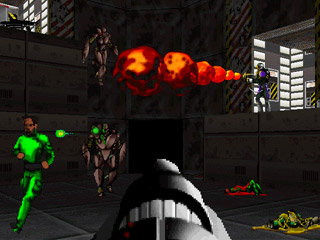
Marathon was the first Mac game I bought and I played it quite a bit. So much so that I even made a website devoted to it, as well as couple maps for the game. Below are the maps I created, as well as some video of death matches that I took part in. I also ported the original midi files to match Quicktime 2.0, the original QT used in the game. If you need the game, luckly you can get it free from Bungie's website.
Maps
To play these, rename them to "Map" (and of course rename your original map file to something else). These maps only work for the original Marathon.
- First Map - Like it says, the first map I made. Has a couple issues, but works. Not very fun though. Learned a lot about what not to do with a Marathon map (like you can't have two openings above one another showing, that crashes the game ;). [May 3, 1995]
- Vitaflo - The first release of a decent map. It's actually not bad, though it's a bit big. The best room is the one with the platform switches that allow you to crush your opponent when they're camping on the ledge trying to snipe you. Apparently it was linked on marathon.org with a comment saying, "Man, someone should teach this guy about the proper use of textures." Hey at least someone actually played it. ;) [May 10, 1995]
Films
Replay my glory years as a Marathon player and revel in how much I sucked.
- Waldo - All Waldo games were played in Waldorf Hall at Gustavus Adolphus College, thus the name. [May 11, 1995]
- Waldo2
- Waldo3
- Waldo4
- Waldo5
- Vita - You must use the Vitaflo map to see this one properly, gives a good sense of the level. [May 11, 1995]
- Chuck - All Chuck games were played against my friend Chuck (who isn't very good). [Aug 4, 1996]
- Chuck1
- Chuck2
- Chuck3
- Macworld '95 Finals - Didn't play in this one, but it's the finals of the Marathon tourney at Macworld in '95 [Jan 11, 1995]
Music
Marathon used Quicktime 2.0 midi for its music which used Roland Sound Canvas instruments. However QT 2.0 didn't include all of Roland's midi instruments. If a midi file used a Roland instrument not in QT 2.0 it would map it to one of the instruments that was in QT 2.0.
Marathon's music used several Roland instruments that were not in QT 2.0 and were thus mapped to different instruments in the game. Most of us remember the music using these mapped QT 2.0 instruments. This caused a problem when Quicktime 3.0 came out and included all Roland instruments. The sounds were then changed to their actual, non-mapped Roland instruments, which made the music sound weird to anyone who had played Marathon up to that point.
If you download the original Marathon midi files and play them on any Roland midi hardware synth like an SC-55 or SC-33, the Marathon music will sound like Quicktime 3.0, not the 2.0 version you probably remember.
Since I own a Roland midi synth (an SC-33) and wanted to play the midi files like they sounded in QT 2.0, I decided to figure out what instruments were mapped in Quicktime 2.0 and change those instruments in the Marathon midi files. Below you can download the original midi files as well as midi files that were changed to use QT 2.0 instruments only. This allows you to play the original Marathon music on a Roland hardware synth with the Quicktime 2.0 instruments you remember.
Note: Quicktime 2.0 used downsampled instruments at 8-bit 22khz. To get more of that "Quicktime 2.0 feel" out of a Roland hardware midi synth, you can downsample with a bitcrusher, turn off all effects like reverb and chorus, and boost low and high EQ to get something closer to what you would get out of a Mac running QT 2.0.